Ask a sales leader where last quarter’s pipeline went and you will usually get a shrug, a spreadsheet, or a week of detective work. That is not a people problem. It is a systems problem: the tools revenue teams rely on were built to show the present, not to remember how the present came to be.
The CRM is built to show you now
Salesforce and HubSpot do keep some history. There is a stage log here and a few tracked fields there. But that history is capped, it ages out, and it is stored for audits rather than analysis. Field history covers a limited set of fields and is designed to check one record, not to analyze a whole pipeline.
So when a board member asks what happened to the pipeline you had in January, the pieces that would answer the question were never tracked, have already aged out, or sit in systems nobody has connected.
What a log misses
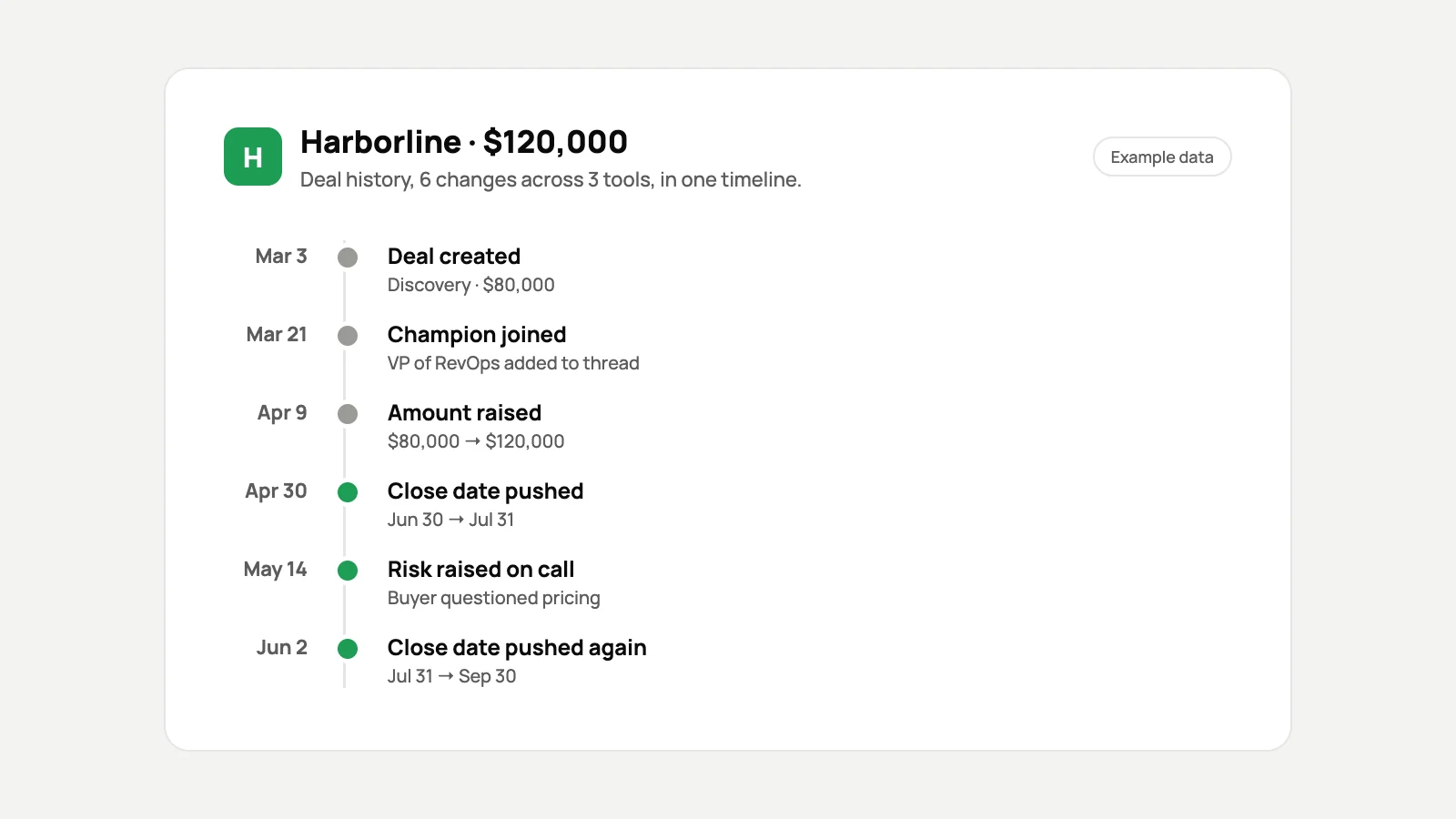
- Sequence. A snapshot tells you a deal is in Negotiation. It does not tell you the close date was pushed twice.
- Context. The pricing objection raised on a call lives in the call recorder, not in the opportunity record.
- Identity. The same customer can appear under slightly different names in five different systems.
The story is scattered across your stack
Revenue data does not live in one place. Calls live in one tool, emails in another, invoices in a third. Marketing touches sit in the marketing platform, support tickets in the help desk and payments in billing. No single system can say what a customer experienced from first marketing touch through sale, onboarding, support and renewal.
Why the usual workarounds fall short
Most teams try to close the gap with one of three approaches. Each one covers part of the problem.
| Approach | What it captures | Where it falls short |
|---|---|---|
| CRM audit trails and field history | A handful of tracked fields in one system | Built for compliance rather than analysis, and history ages out |
| BI dashboards and warehouse projects | A broad picture once the pipelines exist | Take quarters to build, need data engineering and still show snapshots |
| Revenue intelligence platforms | Forecasts and conversations | Each covers its own slice of the stack and keeps insights inside its own interface |
AI made the gap urgent
Revenue teams now expect to ask Claude or ChatGPT about their pipeline the way they would ask an analyst. But an assistant can read your CRM, not what it said last month. Without a memory of how deals moved, what was promised, or which accounts looked like churned customers before they left, it can only comment on the present.
Questions a snapshot cannot answer
- Which deals have pushed their close date more than once, and what do they have in common?
- What did our won deals look like three weeks in, compared with the ones we lost?
- Which current accounts look like our churned customers did 90 days before they left?
Record, don’t overwrite
The fix is a record that keeps every change instead of replacing it: every stage move, close-date push, amount change and new contact, with a timestamp, matched to the right people and companies across CRM, email, calendar, calls, marketing, support and billing. That is the idea behind a flight recorder for revenue: a memory layer that captures how things got where they are, queryable by people and by AI.
If you want to see how that works on your own pipeline, the evaluation process is laid out step by step, from kickoff to the day-30 readout.
See how the 30-day revenue evaluation works
Your CRM stays the place your team works. A record of every change simply makes sure nobody has to reconstruct the story again.